The audit trail in your time tracking software records every change to salaries, leave allowances, hours and tasks with the exact date, time and the person behind it.
The payroll review asks when a salary went up, and the answer sits somewhere in an email thread.
Someone corrected an entitlement last spring and the correction left no trace anyone can point at.
A booked afternoon has been edited twice and you cannot say who edited it or what it said before.
The colleague who made the change is gone, and the reasoning went with them.
Nothing to switch on and nothing to fill in afterwards. The record is written while your people work.
Change a salary, a role, a location, a leave entitlement, a booked hour or a task, and the change is recorded there and then.
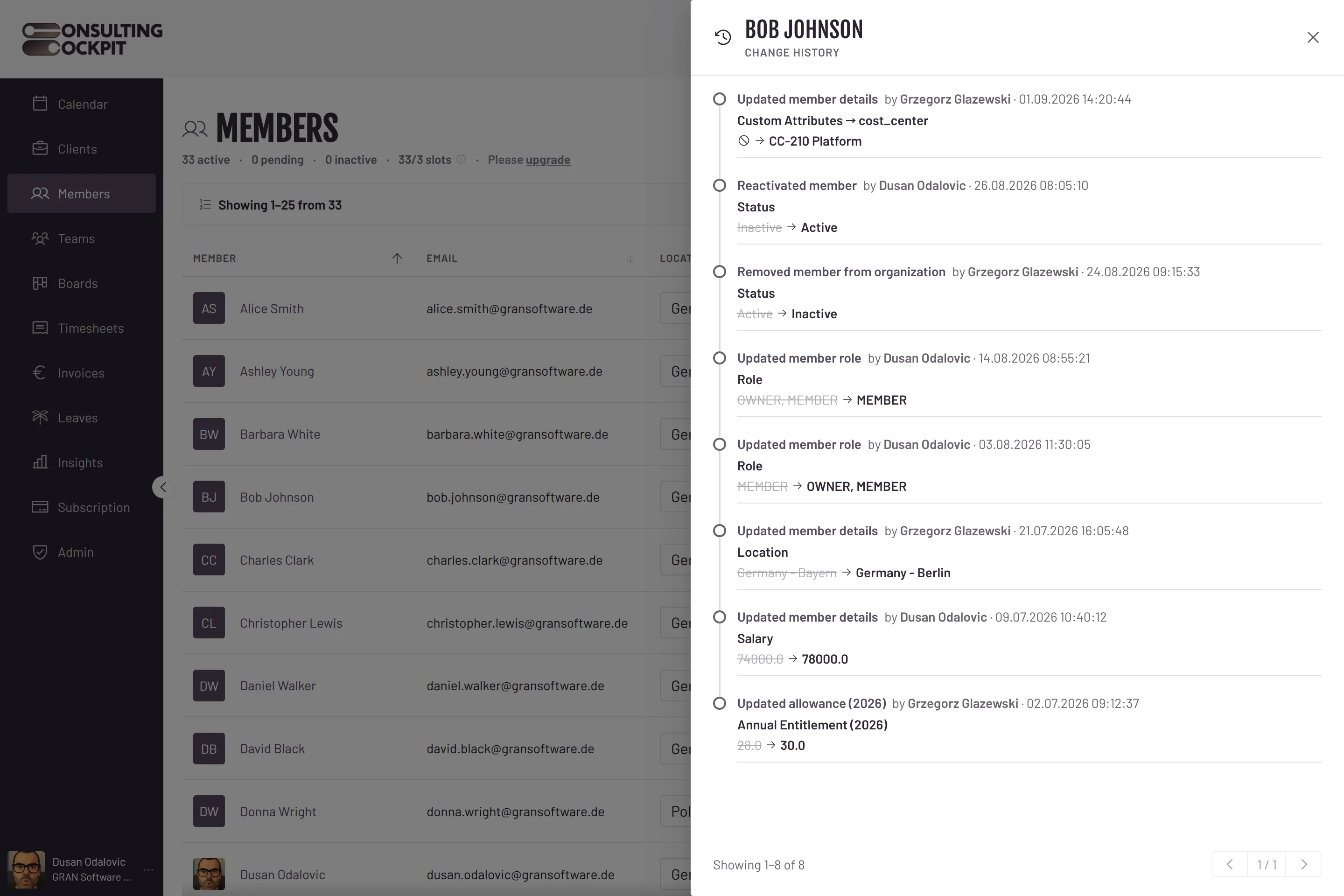
Each line names what changed in plain words — Annual Entitlement, Salary, Role, Start Time — and shows the value before it struck through, next to the value after.
Every entry carries the full name of the person who made the change and the date and time to the second, shown in your own time zone.
Open the history from a consultant's profile, a time entry or a task card and read it as a timeline, newest change first.
The details that decide whether a history is worth anything in a review.
There is no button anywhere in Consulting Cockpit to edit or delete a history entry, not even for the owner.
Every consultant sees the change history of their own profile, so a correction to their leave allowance is never a private edit.
A location change reads as the country and region, an assignee as the person, a booked hour as the project it moved to.
A deletion is recorded as its own event, with the person, the time and the values the entry had before it was removed. The hours leave the calendar, not the history.
When a time entry is split or copied, the new entries are logged too, so a tax audit can follow the hours from one record to the next.
If a form is saved without a real change, no entry appears, so the timeline shows actual changes only.
Leave allowances are the entries a payroll review asks about first, where the records are held is what a client's vendor review asks, and teams leaving Clockify get a side-by-side of their own. See Days Off Management , EU Sovereignty and Clockify Alternative
Real screens from the product — swipe or use the arrows.
Employee records (salary, role, location, active or inactive status, custom attributes), yearly leave allowances, time entries, and board tasks including their comments and tags. Clients, projects and invoices do not have a change history yet.
Owners, from the member profile in the Members area. Each consultant can additionally open the history of their own profile.
The deletion is recorded with the person, the exact time and the values the entry had. The hours disappear from the calendar, but not from the history.
No. The application only reads the history — there is no way to alter or remove an entry from inside Consulting Cockpit.
Every change made since the history went live for your organisation is kept. Nothing in the application removes older entries.
Not as a file today. The history is shown on screen next to the record and paged, so you can walk an auditor through one consultant, one booked hour or one task at a time.
No, and we claim no certification, GoBD included. The change log supports tax and payroll reviews by showing who changed what and when; it supports your own GoBD obligations but does not replace the records in your accounting or payroll system.
Set up your organisation, change one leave allowance, and watch the entry appear with your name and the exact time on it. Free for 30 days.